
TAMNA
Settle a legendary island kingdom — a free settlement board game with real-time matches and weekly rankings.
Play now →
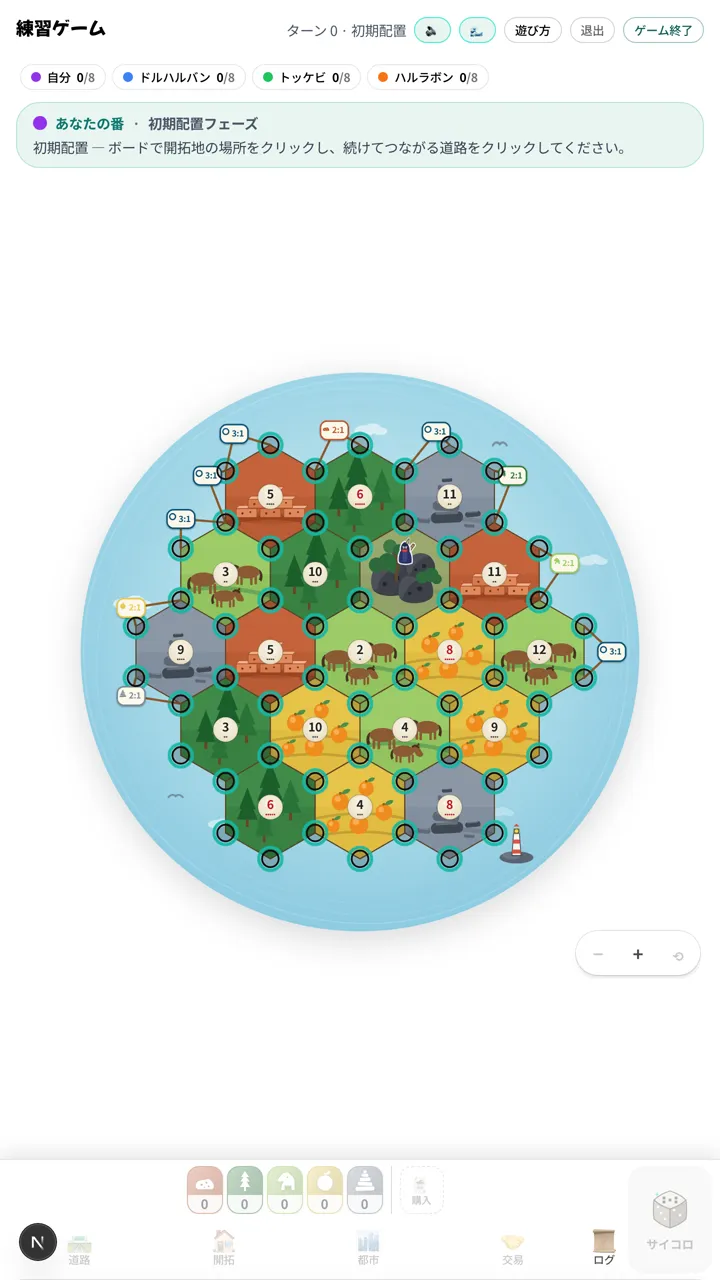

TAMNA is a free online settlement board game inspired by the legends of Jeju Island. On the island of Tamna, surrounded by volcanoes and the sea, you gather resources to build roads, villages and cities, use trading and development cards to your advantage, and race to be the first to reach the target victory points. There is nothing to install — open your browser and you are ready to play.
Playing alone? Practice against bots with selectable difficulty. Playing with friends? Send a single invite link and up to four players join the same room for a real-time match. In a hurry, Quick Start auto-matches you into an open room, or spins up a fresh game with three bots right away. Challenge a friend and they get a real-time invite banner, and you can chat inside the room while you play. When the dice roll a seven, a mischievous Dokkaebi appears and blocks a tile, while the Naru (harbors) along the coast open up favorable trades. Even the resources are island-flavored: clay, timber, horsehair, tangerines, and basalt.
A guided tutorial of about two minutes teaches the basics, so the game is approachable even if this is your first board game. Sign in and your match history is saved, so you can measure yourself on the weekly leaderboard that resets every Monday and on your lifetime record. TAMNA supports English, Korean, and Japanese, and plays the same on phones and PCs.
Features
🆓Completely free, sign-up optional
No install. Play practice mode right away without an account.
🤖Solo vs bots
Battle bots anytime, with selectable difficulty.
⚡Quick Start
Auto-match into an open room, or start instantly with three bots.
👥Up to 4 players, real-time
Invite links or a direct challenge put you in the same live room.
💬In-game chat
Chat inside the room while you play.
🏆Weekly ranking and records
A weekly leaderboard that resets every Monday, plus your lifetime record.
🎓Guided tutorial
Learn the rules in about two minutes.
📱Mobile and PC
Anywhere with a browser. Responsive design.
🌐Three languages
English, Korean, and Japanese are supported.
How to play (step by step)
- 1Place your starting villages and roads.
- 2On your turn, roll the dice and collect resources from tiles adjacent to the rolled number.
- 3Spend resources to build roads, villages and cities, trade with Naru (harbors) or the bank, or buy development cards.
- 4Villages score 1 point and cities 2, with bonuses for the Longest Route and the Greatest Force.
- 5The first player to reach the target victory points wins.
Strategy Guide
Your opening placement shapes the entire game. Keep these six points in mind and your next match will go much smoother.
Prioritize 6 and 8 tiles
With two dice, 6 and 8 are the most likely sums after 7 (5/36 each). Aim for your first settlement to touch at least two tiles numbered 6 or 8 for steady resource income.
Don't overcommit to one resource
Roads and settlements need clay and lumber; city upgrades need tangerine and basalt; development cards need basalt, horsehair, and tangerine. Position your first two settlements to cover a spread of resources.
Naru (harbors) are more powerful than they look
Settling near a 3:1 general Naru or a 2:1 specialty Naru lets you convert surplus resources efficiently. If you expect to overproduce one resource, aim for its 2:1 Naru.
Keep your hand at 7 cards or fewer
Rolling a 7 triggers the Dokkaebi, and anyone holding 8+ cards at that moment discards half. Get in the habit of spending surplus resources on building, trading, or cards each turn.
Buy development cards ahead of time
You can't play a card the same turn you buy it (except VP cards), so buy before you need them. Also, as the deck shrinks below 10 cards, your odds of drawing a VP card go up.
Commit to Longest Route or Greatest Force — not both
Chasing both bonuses splits your resources and often wins neither. Read your starting production early and pick a road-focused or development-card-focused path.
More guides for this game
- Beating the bots in TAMNA — Easy, Mid and Hard run different playbooks
TAMNA bots do not simply get sharper as difficulty rises; their list of actions changes. Mid never buys a development card and skips roads and trading roughly 45% of turns, and only Hard runs General cards. Here is what triggers the automatic difficulty bump, and exactly what makes a bot accept your trade.
- Reviewing a TAMNA game — reading the game log and the replay after you lose
A finished game of TAMNA can be read a second time. What the game log records, what the replay rewinds (and what it never will), and what the win rate on My record is actually counting. A step-by-step routine for taking exactly one change out of a loss.
- Your first game of TAMNA — what the tutorial does not tell you
The TAMNA tutorial takes about two minutes, and what it leaves out matters more than what it covers. How many of the fourteen steps you actually play, why the glowing spot is not advice, why every roll is a six, and why the resources it hands you do not exist in a real game.
- Seasons and rankings in TAMNA — the five leaderboard tabs, and how titles unlock
The TAMNA leaderboard has five tabs, and each one counts and sorts differently. Tabs ordered by wins versus the one ordered by win rate, the exact moment a season turns over, and the six titles that unlock from daily visits and the daily challenge. A practical guide to reading the standings.
Devlog
- A 54% win rate against a 25% baseline — and 5% of that data was invisible
It started as a hunch that the bots were too soft. The data said humans won 54% of solo matches against a 25% baseline. Then it turned out the query itself had a 5% blind spot.
- Every quality gate passed, and 5 minutes 43 seconds later I deleted it — the TAMNA board sky
tsc passed. lint passed. Live checks passed. Then I deleted 131 lines, 5 minutes and 43 seconds later. This is what happens when a one-line requirement ships with no acceptance criteria.
Frequently asked questions
- Is it free?
- Yes, completely free. You can play practice mode without creating an account.
- Do I need to install anything?
- No. Just open the URL in your browser — it works on both mobile and PC.
- Can I play alone?
- Yes. You can play solo against bots with selectable difficulty.
- How many people can play together?
- Up to four. Create a room and share the invite link, or challenge a friend and they join from a real-time invite banner. In a hurry, Quick Start auto-matches you.
- Are the rules hard to learn?
- A guided tutorial of about two minutes teaches beginners the basics quickly.
- Do I need an account?
- No. You can play practice mode without logging in. An account adds saved match history, the weekly leaderboard that resets every Monday, and friends.